This is the multi-page printable view of this section. Click here to print.
Interfaces
- 1: Client Server
- 2: Registry
- 3: Broker
- 4: Transport
1 - Client Server
- The client is used to make requests to other services.
- The server handles incoming requests.
Both client and server are pluggable and support middleware wrappers for additional functionality.
Example Usage
Here’s how to define a simple handler and register it with a Go Micro server:
package main

import (
    "context"
    "go-micro.dev/v6"
    "log"
)

type Greeter struct{}

func (g *Greeter) Hello(ctx context.Context, req *struct{}, rsp *struct{Msg string}) error {
    rsp.Msg = "Hello, world!"
    return nil
}

func main() {
    service := micro.NewService("greeter",
    )
    service.Init()
    micro.RegisterHandler(service.Server(), new(Greeter))
    if err := service.Run(); err != nil {
        log.Fatal(err)
    }
}
2 - Registry
Features
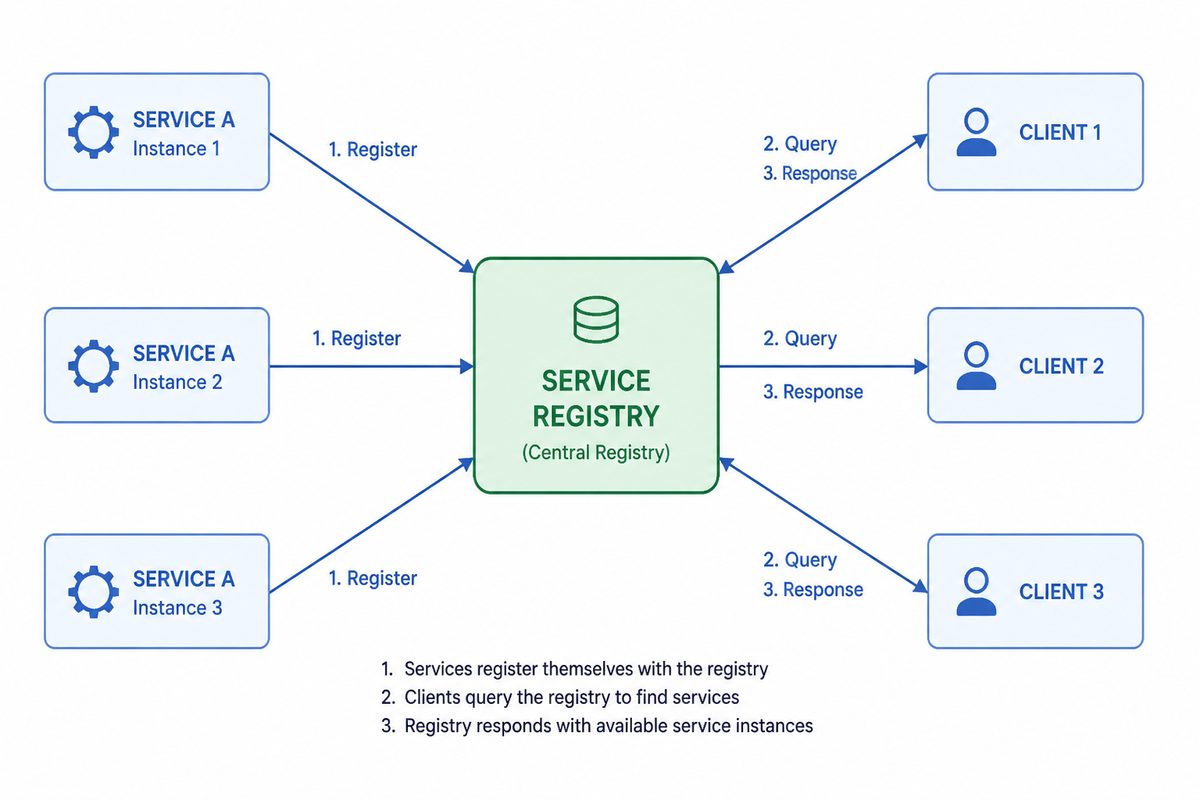
- Service registration and deregistration
- Service lookup
- Watch for changes
Implementations
Go Micro supports multiple registry backends, including:
- MDNS (default)
- Consul
- Etcd
- NATS
You can configure the registry when initializing your service.
Plugins Location
Registry plugins live in this repository under go-micro.dev/v6/registry/<plugin> (e.g., consul, etcd, nats). Import the desired package and pass it via micro.Registry(...).
Configure via environment
MICRO_REGISTRY=etcd MICRO_REGISTRY_ADDRESS=127.0.0.1:2379 micro server
Common variables:
MICRO_REGISTRY: selects the registry implementation (mdns,consul,etcd,nats).MICRO_REGISTRY_ADDRESS: comma-separated list of registry addresses.
Backend-specific variables:
- Etcd:
ETCD_USERNAME,ETCD_PASSWORDfor authenticated clusters.
Example Usage
Here’s how to use a custom registry (e.g., Consul) in your Go Micro service:
package main

import (
    "go-micro.dev/v6"
    "go-micro.dev/v6/registry/consul"
)

func main() {
    reg := consul.NewRegistry()
    service := micro.NewService("registry-example",
        micro.Registry(reg),
    )
    service.Init()
    service.Run()
}
3 - Broker
Features
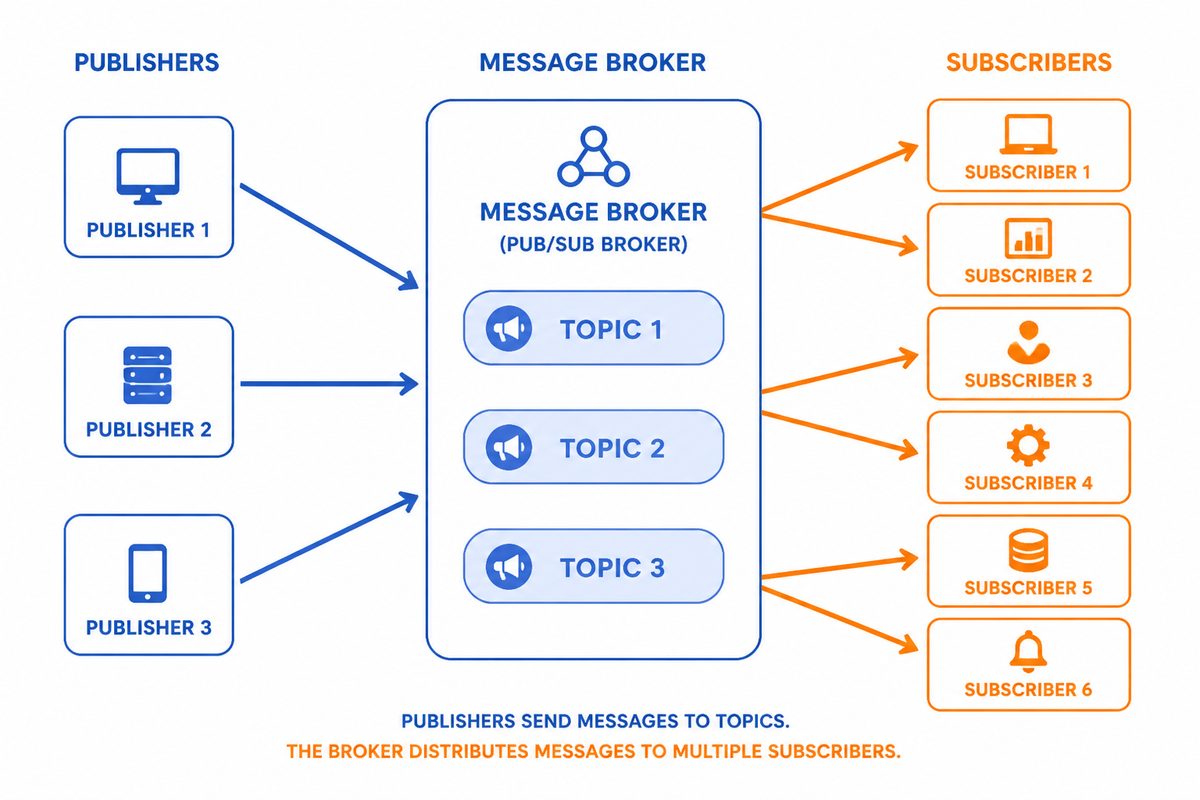
- Publish messages to topics
- Subscribe to topics
- Multiple broker implementations
Implementations
Supported brokers include:
- HTTP (default)
- NATS (
go-micro.dev/v6/broker/nats) - RabbitMQ (
go-micro.dev/v6/broker/rabbitmq) - Memory (
go-micro.dev/v6/broker/memory)
Plugins are scoped under go-micro.dev/v6/broker/<plugin>.
Configure the broker in code or via environment variables.
Example Usage
Here’s how to use the broker in your Go Micro service:
package main

import (
    "go-micro.dev/v6"
    "go-micro.dev/v6/broker"
    "log"
)

func main() {
    service := micro.NewService("publisher")
    service.Init()

    // Publish a message
    if err := broker.Publish("topic", &broker.Message{Body: []byte("hello world")}); err != nil {
        log.Fatal(err)
    }

    // Subscribe to a topic
    _, err := broker.Subscribe("topic", func(p broker.Event) error {
        log.Printf("Received message: %s", string(p.Message().Body))
        return nil
    })
    if err != nil {
        log.Fatal(err)
    }

    // Run the service
    if err := service.Run(); err != nil {
        log.Fatal(err)
    }
}
Configure a specific broker in code
NATS:
import (
    "go-micro.dev/v6"
    bnats "go-micro.dev/v6/broker/nats"
)

func main() {
    b := bnats.NewNatsBroker()
    svc := micro.NewService("publisher", micro.Broker(b))
    svc.Init()
    svc.Run()
}
RabbitMQ:
import (
    "go-micro.dev/v6"
    "go-micro.dev/v6/broker/rabbitmq"
)

func main() {
    b := rabbitmq.NewBroker()
    svc := micro.NewService("publisher", micro.Broker(b))
    svc.Init()
    svc.Run()
}
Configure via environment
Using the built-in configuration flags/env vars (no code changes):
MICRO_BROKER=nats MICRO_BROKER_ADDRESS=nats://127.0.0.1:4222 go run main.go
Common variables:
MICRO_BROKER: selects the broker implementation (http,nats,rabbitmq,memory).MICRO_BROKER_ADDRESS: comma-separated list of broker addresses.
Notes:
- NATS addresses should be prefixed with
nats://. - RabbitMQ addresses typically use
amqp://user:pass@host:5672.
4 - Transport
Features
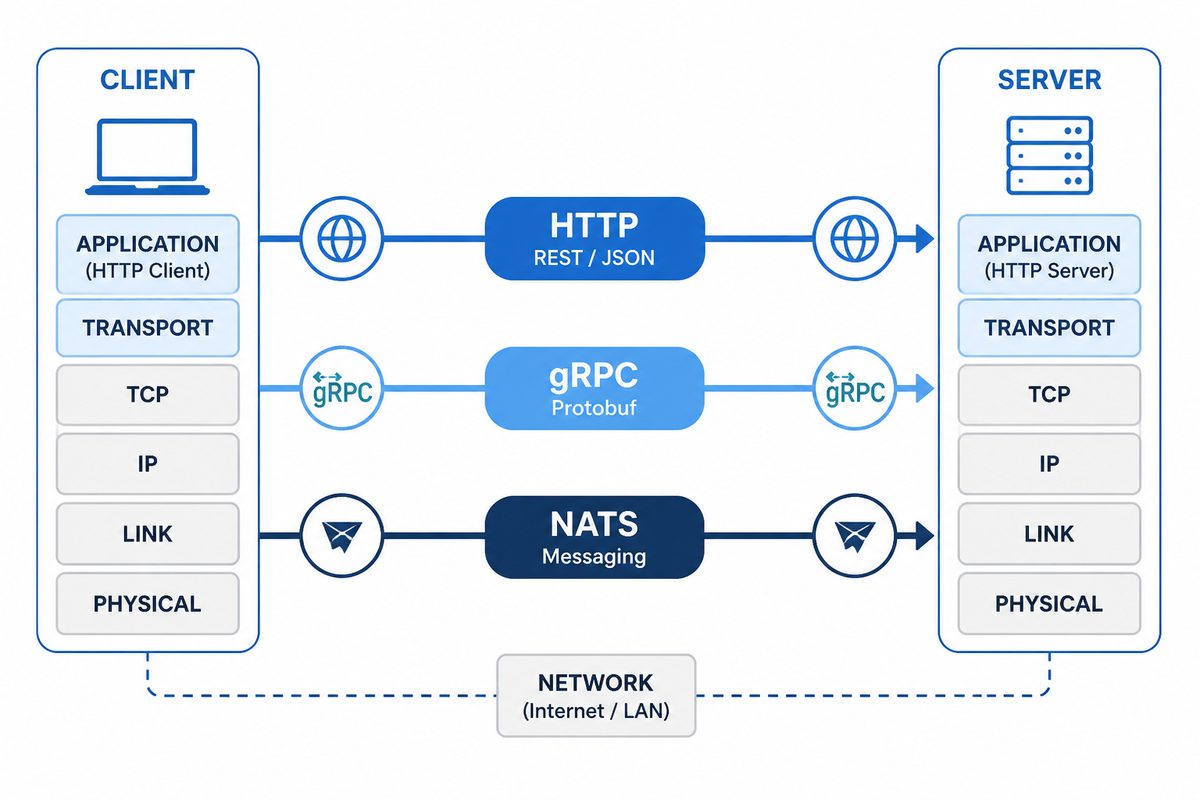
- Pluggable transport implementations
- Secure and efficient communication
Implementations
Supported transports include:
- HTTP (default)
- NATS (
go-micro.dev/v6/transport/nats) - gRPC (
go-micro.dev/v6/transport/grpc) - Memory (
go-micro.dev/v6/transport/memory)
Important: Transport vs Native gRPC
The gRPC transport uses gRPC as an underlying communication protocol, similar to how NATS or RabbitMQ might be used. It does not provide native gRPC compatibility with tools like grpcurl or standard gRPC clients generated by protoc.
If you need native gRPC compatibility (to use grpcurl, polyglot gRPC clients, etc.), you must use the gRPC server and client packages instead:
import (
    grpcServer "go-micro.dev/v6/server/grpc"
    grpcClient "go-micro.dev/v6/client/grpc"
)

service := micro.NewService("myservice",
    micro.Server(grpcServer.NewServer()),
    micro.Client(grpcClient.NewClient()),
)
See Native gRPC Compatibility for a complete guide.
Plugins are scoped under go-micro.dev/v6/transport/<plugin>.
You can specify the transport when initializing your service or via env vars.
Example Usage
Here’s how to use a custom transport (e.g., gRPC) in your Go Micro service:
package main

import (
    "go-micro.dev/v6"
    "go-micro.dev/v6/transport/grpc"
)

func main() {
    t := grpc.NewTransport()
    service := micro.NewService("transport-example",
        micro.Transport(t),
    )
    service.Init()
    service.Run()
}
NATS transport:
import (
    "go-micro.dev/v6"
    tnats "go-micro.dev/v6/transport/nats"
)

func main() {
    t := tnats.NewTransport()
    service := micro.NewService("transport-example", micro.Transport(t))
    service.Init()
    service.Run()
}
Configure via environment
MICRO_TRANSPORT=nats MICRO_TRANSPORT_ADDRESS=nats://127.0.0.1:4222 go run main.go
Common variables:
MICRO_TRANSPORT: selects the transport implementation (http,nats,grpc,memory).MICRO_TRANSPORT_ADDRESS: comma-separated list of transport addresses.