Your Microservices Are Already an AI Platform
March 5, 2026 — By the Go Micro Team
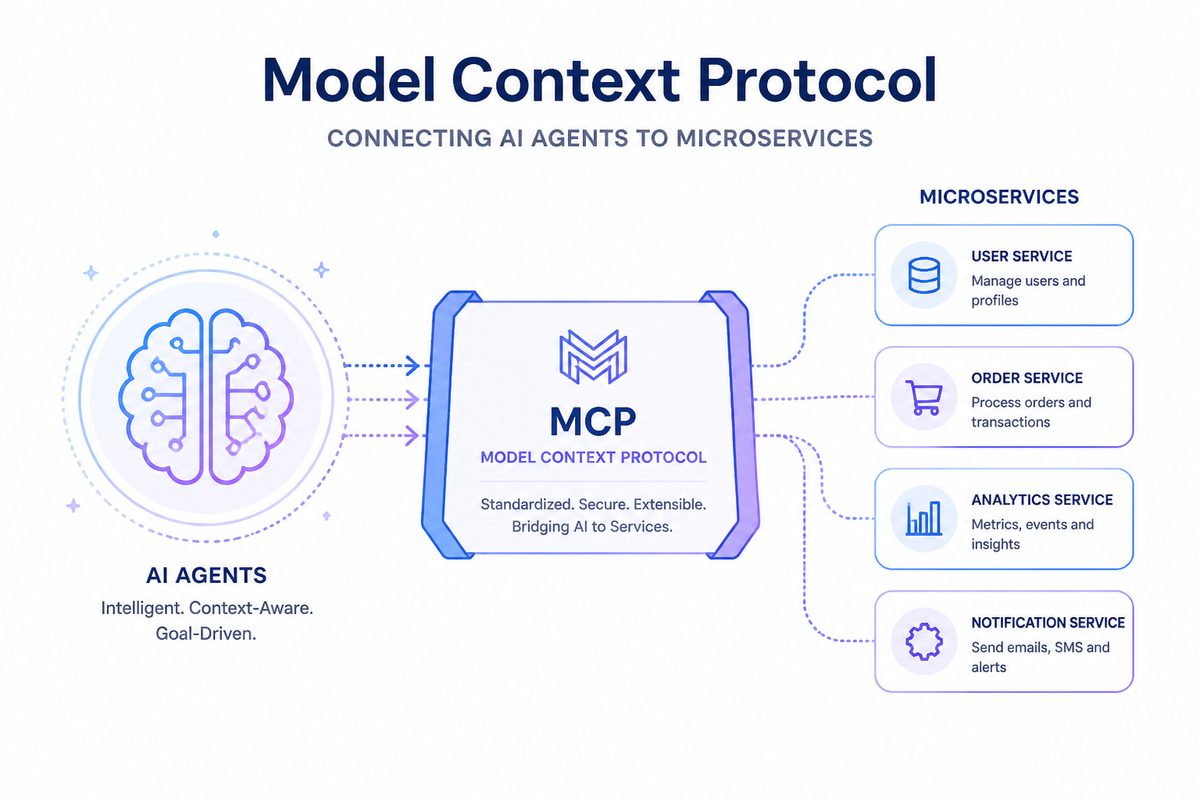
Here’s the pitch: you have microservices. They already have well-defined endpoints, typed request/response schemas, and service discovery. An AI agent needs the same things — a list of tools with input schemas and descriptions. The gap between “microservice endpoint” and “AI tool” is surprisingly small.
With Go Micro + MCP, that gap is zero lines of code.
The Setup: A Blogging Platform
We’ll use a blogging platform as our example — inspired by micro/blog, a real microblogging platform built on Go Micro with four domains:
- Users — signup, login, profiles
- Posts — blog posts with markdown, tags, link previews
- Comments — threaded comments on posts
- Mail — internal messaging
A Note on Architecture
Go Micro has always been a framework for building multi-service, multi-process systems. The micro/blog platform is a great example — each service runs as its own binary, communicates over RPC, and is independently deployable. If that’s what you’re after, check it out.
For this walkthrough, we take a different approach: a modular monolith. All four domains live in a single process. This is a perfectly valid starting point — you get the clean separation of handler interfaces without the operational overhead of multiple services. And because Go Micro’s handler registration works the same way in both models, you can break these out into separate services later as your team or requirements grow. No rewrite needed.
One Line to Agent-Enable Everything
service := micro.NewService("platform",
    micro.Address(":9090"),
    mcp.WithMCP(":3001"),  // This is it
)

service.Handle(users)
service.Handle(posts)
service.Handle(&Comments{})
service.Handle(&Mail{})
That mcp.WithMCP(":3001") starts an MCP gateway that:
- Discovers all registered handlers on the service
- Converts Go method signatures into JSON tool schemas
- Extracts descriptions from doc comments
- Serves it all as MCP-compliant tool definitions
No wrapper code. No API translation layer. No agent-specific handlers.
What the Agent Sees
When an agent connects to http://localhost:3001/mcp/tools, it gets a tool list like:
{
  "tools": [
    {
      "name": "platform.Users.Signup",
      "description": "Signup creates a new user account and returns a session token.",
      "inputSchema": {
        "type": "object",
        "properties": {
          "name": {"type": "string", "description": "Username (required, 3-20 characters)"},
          "password": {"type": "string", "description": "Password (required, minimum 6 characters)"}
        }
      }
    },
    {
      "name": "platform.Posts.Create",
      "description": "Create publishes a new blog post.",
      "inputSchema": {
        "type": "object",
        "properties": {
          "title": {"type": "string", "description": "Post title (required)"},
          "content": {"type": "string", "description": "Post body in markdown (required)"},
          "author_id": {"type": "string", "description": "Author's user ID (required)"},
          "author_name": {"type": "string", "description": "Author's display name (required)"}
        }
      }
    }
  ]
}
The agent doesn’t need to know it’s talking to microservices. It just sees tools.
A Real Agent Workflow
Here’s what happens when you tell an agent: “Sign up a new user called carol, write a post about Go concurrency, tag it, and send alice a mail about it.”
The agent figures out the sequence on its own:
Step 1: Sign up
→ platform.Users.Signup {"name": "carol", "password": "welcome123"}
← {"user": {"id": "user-3", "name": "carol"}, "token": "abc123..."}
Step 2: Write the post (using the returned user ID)
→ platform.Posts.Create {
    "title": "Go Concurrency Patterns",
    "content": "Go's concurrency model is built on goroutines and channels...",
    "author_id": "user-3",
    "author_name": "carol"
  }
← {"post": {"id": "post-2", "title": "Go Concurrency Patterns", ...}}
Step 3: Tag it (using the returned post ID)
→ platform.Posts.TagPost {"post_id": "post-2", "tag": "golang"}
→ platform.Posts.TagPost {"post_id": "post-2", "tag": "concurrency"}
Step 4: Notify alice
→ platform.Mail.Send {
    "from": "carol",
    "to": "alice",
    "subject": "New post: Go Concurrency Patterns",
    "body": "Hi Alice, I just published a post about Go concurrency..."
  }
No orchestration engine. No workflow definition. The agent reads the tool descriptions, understands the data flow (signup returns a user ID, create returns a post ID), and chains the calls naturally.
Why Doc Comments Matter
The agent’s ability to chain these calls correctly comes from good descriptions. Compare:
// Bad: agent doesn't know what this returns or when to use it
func (s *Users) Signup(ctx context.Context, req *SignupRequest, rsp *SignupResponse) error {

// Good: agent knows the purpose, constraints, and return value
// Signup creates a new user account and returns a session token.
// The username must be unique. Use the returned token for authenticated operations.
//
// @example {"name": "alice", "password": "secret123"}
func (s *Users) Signup(ctx context.Context, req *SignupRequest, rsp *SignupResponse) error {
The @example tag is especially valuable — it gives the agent a concrete input to work from, reducing errors and hallucinated field names.
Similarly, description struct tags on request/response fields tell the agent what each parameter means:
type CreatePostRequest struct {
    Title      string `json:"title" description:"Post title (required)"`
    Content    string `json:"content" description:"Post body in markdown (required)"`
    AuthorID   string `json:"author_id" description:"Author's user ID (required)"`
    AuthorName string `json:"author_name" description:"Author's display name (required)"`
}
Adding MCP to Existing Services
This demo runs everything in one process, but if you already have Go Micro services running as separate processes (like micro/blog), you have two additional options beyond the in-process approach shown above:
Option 1: Standalone gateway binary
Point a gateway at your service registry and it discovers all running services automatically:
micro-mcp-gateway --registry consul:8500 --address :3001
Option 2: Sidecar in your deployment
# docker-compose.yml
services:
  blog:
    image: micro/blog
  mcp-gateway:
    image: micro/mcp-gateway
    environment:
      - REGISTRY=consul:8500
    ports:
      - "3001:3001"
Both discover services from the registry and expose them as MCP tools. Zero changes to your service code.
Production Considerations
The MCP gateway includes everything you need for production:
- Auth & Scopes — per-tool permissions with JWT tokens
- Rate Limiting — token bucket per tool
- Circuit Breakers — protect downstream services from cascading failures
- Audit Logging — immutable records of every tool call
- OpenTelemetry — full span instrumentation with trace context propagation
mcp.WithMCP(":3001",
    mcp.WithAuth(jwtProvider),
    mcp.WithRateLimit(100, 20),
    mcp.WithCircuitBreaker(5, 30*time.Second),
    mcp.WithAudit(auditLogger),
)
Try It
cd examples/mcp/platform
go run .
Then point any MCP-compatible agent at http://localhost:3001/mcp/tools and start talking to your services.
The full example is at examples/mcp/platform/.
What’s Next
We’re working on a Kubernetes operator that automatically deploys MCP gateways alongside your services, request/response caching to reduce redundant calls from agents, and multi-tenant namespace isolation. See the roadmap for details.
The core idea is simple: well-structured services — whether running as a modular monolith or as independently deployed microservices — already have the right shape for AI tools. We just needed to bridge the protocol gap. With MCP, that bridge is one line of code.
Whether you start with a single process like this demo or go straight to multi-service like micro/blog, the MCP integration works the same way.