Making Microservices AI-Native with MCP
February 11, 2026 • By the Go Micro Team
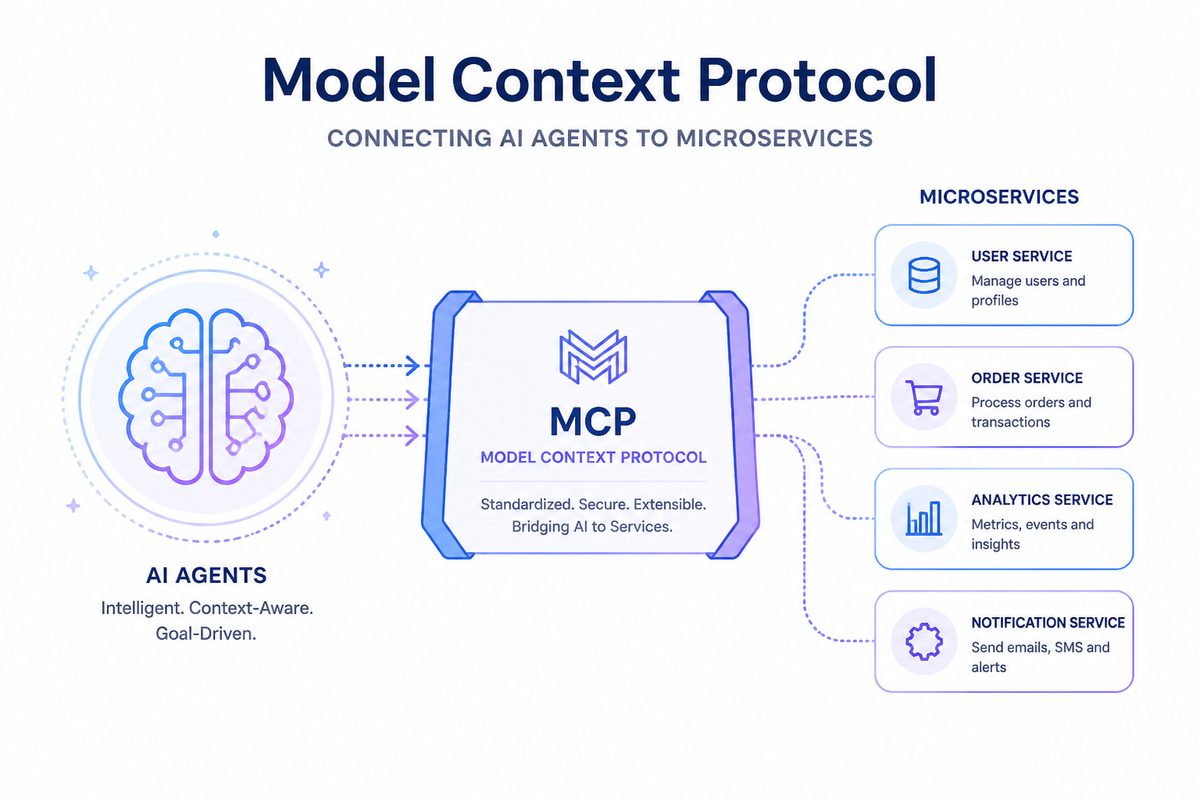
We’re excited to announce MCP (Model Context Protocol) support in Go Micro v5.15.0 — making your microservices instantly accessible to AI tools like Claude.
The Vision
Imagine telling Claude: “Why is user 123’s order stuck?”
Claude responds by:
- Calling your
usersservice to check the account - Calling your
ordersservice to inspect the order - Calling your
paymentsservice to verify the transaction - Giving you a complete diagnosis
No API wrappers. No manual integrations. Your services just work with AI.
What is MCP?
Model Context Protocol is Anthropic’s open standard for connecting AI models to external tools. Think of it like a microservices registry, but for AI.
With MCP, your go-micro services become tools that Claude can discover and call directly.
The Integration
For Library Users (Just Add Comments!)
package main

import (
    "context"
    "go-micro.dev/v5"
    "go-micro.dev/v5/gateway/mcp"
)

type UserService struct{}

// GetUser retrieves a user by ID. Returns user profile with email and preferences.
//
// @example {"id": "user-123"}
func (s *UserService) GetUser(ctx context.Context, req *GetUserRequest, rsp *GetUserResponse) error {
    // implementation
    return nil
}

type GetUserRequest struct {
    ID string `json:"id" description:"User's unique identifier"`
}

type GetUserResponse struct {
    User *User `json:"user" description:"The user object"`
}

func main() {
    service := micro.NewService(micro.Name("users"))
    service.Init()

    // Register handler - docs extracted automatically from comments!
    service.Server().Handle(service.Server().NewHandler(new(UserService)))

    // Add MCP gateway
    go mcp.Serve(mcp.Options{
        Registry: service.Options().Registry,
        Address:  ":3000",
    })

    service.Run()
}
That’s it. Your service is now AI-accessible with automatic documentation.
For CLI Users (Just a Flag)
# Development with MCP
micro run --mcp-address :3000

# Production with MCP
micro server --mcp-address :3000
The CLI integration uses the same underlying library, so you get the same functionality either way.
How It Works
- Service Discovery: MCP gateway queries your registry (mdns/consul/etcd)
- Auto-Exposure: Each service endpoint becomes an MCP tool
- Schema Conversion: Request/response types → JSON Schema for AI
- Dynamic Updates: New services appear as tools automatically
For example, if you have:
type UsersService struct{}

func (u *UsersService) Get(ctx context.Context, req *GetRequest, rsp *GetResponse) error {
    // ...
}

func (u *UsersService) Create(ctx context.Context, req *CreateRequest, rsp *CreateResponse) error {
    // ...
}
Claude sees:
Tools:
- users.UsersService.Get
- users.UsersService.Create
And can call them with natural language: “Get user 123’s details”
Real-World Use Cases
1. AI-Powered Customer Support
# Claude can help support agents
User: "Why is my order taking so long?"

Claude: Let me check...
→ Calls orders.Orders.Get with user's order ID
→ Calls shipping.Shipping.Track with tracking number
→ Calls inventory.Inventory.Check with product ID

Claude: "Your order is waiting for inventory. The product
is expected to be restocked on Feb 15. Would you like to
switch to an in-stock alternative?"
2. Debugging Production Issues
# Tell Claude the symptoms, it investigates
You: "Users can't log in. Check if it's the auth service."

Claude:
→ Calls health.Check on auth service
→ Calls metrics.Get for error rates
→ Calls logs.Recent for auth failures
→ Calls database.ConnectionPool for connection issues

Claude: "The auth service is healthy but the connection
pool is exhausted. Current: 100/100. Recommend increasing
pool size or checking for connection leaks."
3. Automated Operations
# Claude as an operations assistant
You: "Scale up the worker service"

Claude:
→ Calls infrastructure.Services.List to find workers
→ Calls infrastructure.Services.Scale with new count
→ Calls metrics.Monitor to watch the scale-up

Claude: "Scaled from 3 to 5 workers. All healthy and
processing jobs normally."
4. AI Data Analysis
# Claude can query your services for insights
You: "Show me revenue trends for the last quarter"

Claude:
→ Calls analytics.Revenue.GetTrends with date range
→ Calls analytics.Revenue.Compare with previous quarter
→ Calls analytics.Revenue.TopProducts

Claude: "Revenue is up 23% vs Q4. Top driver is product X
with 45% growth. However, churn increased 5% — recommend
investigating retention."
Deployment Patterns
Pattern 1: Embedded Gateway
Add MCP directly to your services:
func main() {
    service := micro.NewService(...)

    go mcp.Serve(mcp.Options{
        Registry: service.Options().Registry,
        Address:  ":3000",
    })

    service.Run()
}
Best for: Simple deployments, quick prototypes
Pattern 2: Standalone Gateway
Deploy a dedicated MCP gateway service:
// cmd/mcp-gateway/main.go
package main

import (
    "go-micro.dev/v5/gateway/mcp"
    "go-micro.dev/v5/registry/consul"
)

func main() {
    mcp.ListenAndServe(":3000", mcp.Options{
        Registry: consul.NewRegistry(),
    })
}
Best for: Production, multiple services, centralized auth
Pattern 3: Docker Compose
version: '3.8'

services:
  users:
    build: ./users
    environment:
      - MICRO_REGISTRY=mdns

  orders:
    build: ./orders
    environment:
      - MICRO_REGISTRY=mdns

  mcp-gateway:
    build: ./mcp-gateway
    ports:
      - "3000:3000"
    environment:
      - MICRO_REGISTRY=mdns
Best for: Local development, testing
Pattern 4: Kubernetes
apiVersion: apps/v1
kind: Deployment
metadata:
  name: mcp-gateway
spec:
  replicas: 2
  template:
    spec:
      containers:
      - name: mcp-gateway
        image: myregistry/mcp-gateway:latest
        ports:
        - containerPort: 3000
        env:
        - name: MICRO_REGISTRY
          value: "consul"
        - name: MICRO_REGISTRY_ADDRESS
          value: "consul:8500"
Best for: Production at scale
Security Considerations
Add Authentication
mcp.Serve(mcp.Options{
    Registry: registry.DefaultRegistry,
    Address:  ":3000",
    AuthFunc: func(r *http.Request) error {
        token := r.Header.Get("Authorization")
        if !validateToken(token) {
            return errors.New("unauthorized")
        }
        return nil
    },
})
Network Isolation
Deploy MCP gateway in a private network:
              Internet
                 │
          ┌──────▼────────┐
          │  micro server │  :8080 (public)
          │   + Auth      │
          └──────┬────────┘
                 │
          ┌──────▼────────┐
          │  MCP Gateway  │  :3000 (private)
          └──────┬────────┘
                 │
      ┌──────────┼──────────┐
      │          │          │
  ┌───▼───┐  ┌──▼────┐  ┌──▼────┐
  │ users │  │ orders│  │payments│
  └───────┘  └───────┘  └────────┘
  (private)  (private)  (private)
Only the HTTP gateway is public. MCP gateway and services are internal.
Library vs CLI
Both approaches use the same underlying library (go-micro.dev/v5/gateway/mcp):
| Approach | Users | Benefits |
|---|---|---|
| Library | Import gateway/mcp package |
Full control, works anywhere (Docker/K8s) |
| CLI | Use --mcp-address flag |
Zero code changes, instant MCP support |
The CLI is just a convenient wrapper around the library.
Getting Started
Install
go get go-micro.dev/v5@v5.16.0
Library Usage
import "go-micro.dev/v5/gateway/mcp"

go mcp.Serve(mcp.Options{
    Registry: service.Options().Registry,
    Address:  ":3000",
})
CLI Usage
micro run --mcp-address :3000
# or
micro server --mcp-address :3000
Test It
# List available tools
curl http://localhost:3000/mcp/tools

# Call a tool
curl -X POST http://localhost:3000/mcp/call \
  -d '{"tool": "users.Users.Get", "input": {"id": "123"}}'
New in v5.16.0: Stdio Transport & Auto-Documentation
We’ve added two major features that make MCP even more powerful:
1. Stdio Transport for Claude Code
Use go-micro services directly in Claude Code with stdio transport:
# Start MCP server with stdio (no HTTP needed)
micro mcp serve
Add to Claude Code config (~/.claude/claude_desktop_config.json):
{
  "mcpServers": {
    "my-services": {
      "command": "micro",
      "args": ["mcp", "serve"]
    }
  }
}
Now Claude Code can discover and call your services directly!
2. Automatic Documentation Extraction
Services now automatically extract documentation from Go comments:
// GetUser retrieves a user by ID from the database.
//
// @example {"id": "user-123"}
func (s *UserService) GetUser(ctx context.Context, req *GetUserRequest, rsp *GetUserResponse) error {
    // implementation
}

// Register handler - docs extracted automatically!
handler := service.Server().NewHandler(new(UserService))
No manual configuration needed! Claude understands your service from your code comments.
3. MCP Command Line Tools
The new micro mcp command provides utilities for working with MCP:
# Start MCP server (stdio by default)
micro mcp serve

# Start with HTTP
micro mcp serve --address :3000

# List available tools
micro mcp list

# Test a tool
micro mcp test users.Users.Get
What’s Next?
We’re continuing to evolve MCP support:
- Streaming responses for long-running operations
- Rate limiting and usage tracking
- MCP server discovery (browse available gateways)
- Enhanced schema generation from struct tags
Philosophy
Go Micro has always been about composable microservices. MCP extends that philosophy:
- Your services, your way: MCP doesn’t change how you build services
- Library-first: Works for all users, not just CLI users
- Zero vendor lock-in: Open protocol, works with any MCP client
- Production-ready: Security, auth, and scaling built-in
AI is becoming infrastructure. Your services should be ready.
Try It Today
# Update to v5.16.0
go get go-micro.dev/v5@v5.16.0

# Add MCP to your service
import "go-micro.dev/v5/gateway/mcp"
go mcp.Serve(mcp.Options{
    Registry: service.Options().Registry,
    Address:  ":3000",
})

# Or use the CLI
micro run --mcp-address :3000
See the MCP Gateway documentation for full details.
Go Micro is an open source framework for distributed systems development in Go. Star us on GitHub.