Older documentation. Start with the current guides.
MCP & AI Agents
Model Context Protocol (MCP)
Go Micro provides built-in support for the Model Context Protocol (MCP), enabling AI agents like Claude to discover and interact with your microservices as tools.
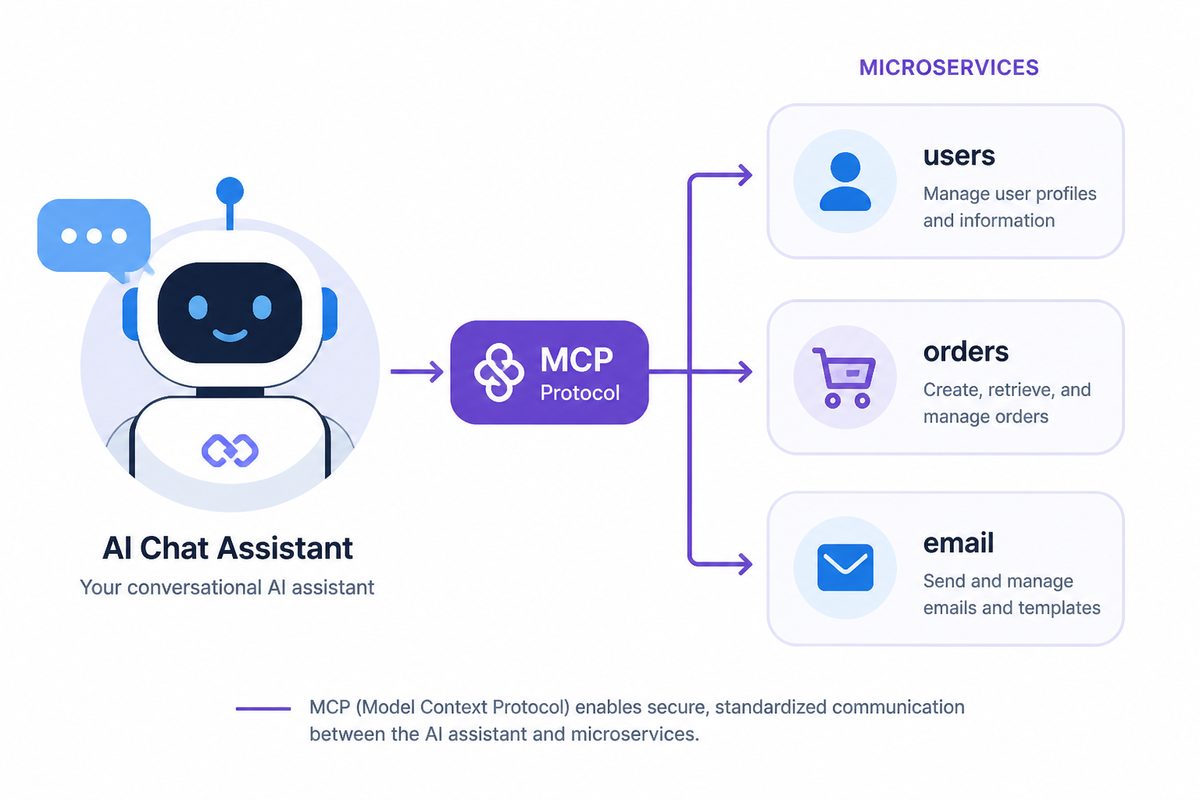
Overview
MCP gateway automatically exposes your microservices as AI-accessible tools through:
- Automatic service discovery via the registry
- Dynamic tool generation from service endpoints
- Stdio transport for local AI tools (Claude Code, etc.)
- Streamable-HTTP transport (spec-compliant JSON-RPC 2.0 at
/mcp) for browser MCP clients - WebSocket transport at
/mcp/wsfor streaming agent frameworks - Legacy REST endpoints at
/mcp/toolsand/mcp/callfor simple tool access - Automatic documentation extraction from Go comments
Quick Start
1. Add Documentation to Your Service
Simply write Go doc comments on your handler methods:
package main

import (
    "context"
    "go-micro.dev/v6"
)

type GreeterService struct{}

// SayHello greets a person by name. Returns a friendly greeting message.
//
// @example {"name": "Alice"}
func (g *GreeterService) SayHello(ctx context.Context, req *HelloRequest, rsp *HelloResponse) error {
    rsp.Message = "Hello " + req.Name
    return nil
}

type HelloRequest struct {
    Name string `json:"name" description:"Person's name to greet"`
}

type HelloResponse struct {
    Message string `json:"message" description:"Greeting message"`
}

func main() {
    service := micro.NewService("greeter")
    service.Init()

    // Register handler - docs extracted automatically from comments!
    service.Handle(new(GreeterService))

    service.Run()
}
That’s it! Documentation is automatically extracted from your Go comments.
2. Start the MCP Server
Option A: Stdio Transport (for Claude Code)
# Start your service
go run main.go

# In another terminal, start MCP server with stdio
micro mcp serve
Add to Claude Code config (`~/.claude/claude_desktop_config.json`):
{
  "mcpServers": {
    "go-micro": {
      "command": "micro",
      "args": ["mcp", "serve"]
    }
  }
}
Option B: HTTP Transport (for web agents)
Start MCP gateway with HTTP/SSE:
micro mcp serve --address :3000
Access tools at `http://localhost:3000/mcp/tools`
For spec-compliant MCP clients (browser and desktop agents), use the streamable-HTTP endpoint at http://localhost:3000/mcp — see Streamable-HTTP Transport below.
3. Use Your Service with AI
Claude can now discover and call your service:
User: "Say hello to Bob using the greeter service"

Claude: [calls greeter.GreeterService.SayHello with {"name": "Bob"}]
       "Hello Bob"
Features
Automatic Documentation Extraction
Go Micro automatically extracts documentation from your handler method comments at registration time. No extra code needed!
For complete documentation details, see the gateway/mcp package documentation.
Authentication & Scopes for MCP Tools
MCP tool calls go through the same authentication and scope enforcement as regular API calls. This means you can control which tokens (and therefore which users, services, or AI agents) can invoke which tools.
Restricting MCP Tool Access
Set endpoint scopes — Visit
/auth/scopesand set required scopes on service endpoints. For example, setinternalonbilling.Billing.Chargeto restrict it.Create scoped tokens — Visit
/auth/tokensand create tokens with specific scopes:- A token with scope
internalcan call endpoints requiringinternal - A token with scope
*has unrestricted access (admin) - A token with no matching scope gets
403 Forbidden
- A token with scope
Use the token — Pass it in the
Authorizationheader for API/MCP calls:
# List available MCP tools (requires valid token)
curl http://localhost:8080/mcp/tools \
  -H "Authorization: Bearer <token>"

# Call a specific tool (scope-checked)
curl -X POST http://localhost:8080/mcp/call \
  -H "Authorization: Bearer <token>" \
  -d '{"tool":"greeter.GreeterService.SayHello","input":{"name":"World"}}'
Common MCP Token Patterns
| Use Case | Token Scopes | What It Can Do |
|---|---|---|
| Internal tooling | internal | Call endpoints tagged with internal scope |
| Production AI agent | greeter, users | Only call greeter and user service endpoints |
| Admin / debugging | * | Full access to all tools |
| Read-only agent | readonly | Call endpoints tagged with readonly scope |
Agent Playground
The agent playground at /agent uses the logged-in user’s session token. Scope checks apply based on the scopes of the user’s account. The default admin user has * scope (full access).
MCP Command Line
The `micro mcp` command provides tools for working with MCP:
# Start MCP server (stdio by default)
micro mcp serve

# Start with HTTP transport
micro mcp serve --address :3000

# List available tools
micro mcp list

# Test a specific tool
micro mcp test greeter.GreeterService.SayHello
Transport Options
The MCP gateway serves four transports from one HTTP server (or stdio when no address is set):
- Stdio - For local AI tools (Claude Code, recommended). Start with
micro mcp serve. - Streamable-HTTP - Spec-compliant JSON-RPC 2.0 at
/mcp. The endpoint for browser MCP clients; CORS is enabled so it works without a proxy. - WebSocket - Bidirectional streaming at
/mcp/wsfor streaming agent frameworks. - Legacy REST - Tool listing and calls at
/mcp/toolsand/mcp/call.
See examples for complete usage.
Streamable-HTTP Transport (Browser MCP Clients)
Point any spec-compliant MCP client (Claude desktop, browser agents) at http://localhost:3000/mcp. The client SDK handles the handshake; the endpoint behaves like this:
POST /mcpwithinitializemints a session, returned in theMcp-Session-Idresponse header:
curl -i -X POST http://localhost:3000/mcp \
  -H "Content-Type: application/json" \
  -d '{"jsonrpc":"2.0","id":1,"method":"initialize","params":{"protocolVersion":"2025-06-18","capabilities":{},"clientInfo":{"name":"my-agent","version":"1.0"}}}'

# Mcp-Session-Id: <session-id>   <- echo this header on later requests
POST /mcpwithtools/listandtools/call, echoing the session id:
curl -X POST http://localhost:3000/mcp \
  -H "Content-Type: application/json" \
  -H "Mcp-Session-Id: <session-id>" \
  -d '{"jsonrpc":"2.0","id":2,"method":"tools/list"}'

curl -X POST http://localhost:3000/mcp \
  -H "Content-Type: application/json" \
  -H "Mcp-Session-Id: <session-id>" \
  -d '{"jsonrpc":"2.0","id":3,"method":"tools/call","params":{"name":"greeter.GreeterService.SayHello","arguments":{"name":"World"}}}'
GET /mcpopens atext/event-streamfor server→client messages;DELETE /mcpterminates the session. JSON-RPC notifications (noid) return202 Acceptedwith no body.
Supported methods: initialize, ping, tools/list, tools/call. Tool calls share the same auth, scope, rate-limit, circuit-breaker, and x402 payment pipeline as the REST endpoints, so scopes set in /auth/scopes are enforced identically.
Gateway Independence
The MCP gateway is its own server, independent of the HTTP API gateway. The CLI (micro gateway --mcp-address :3000, or micro run --mcp-address :3000) starts both servers and shuts them down together; library users start each explicitly with mcp.NewServer (see the gateway guide).
Examples
See `examples/mcp/documented` for a complete working example.