Agents Meet Microservices: A Hands-On Demo
March 4, 2026 • By the Go Micro Team
We talk a lot about AI-native microservices. Time to show it. In this post we’ll build three services — projects, tasks, and team — and then hand them to an AI agent. The agent will create projects, assign tasks, and query team skills using nothing but natural language.
No API wrappers. No tool definitions. Just Go comments.
The Setup
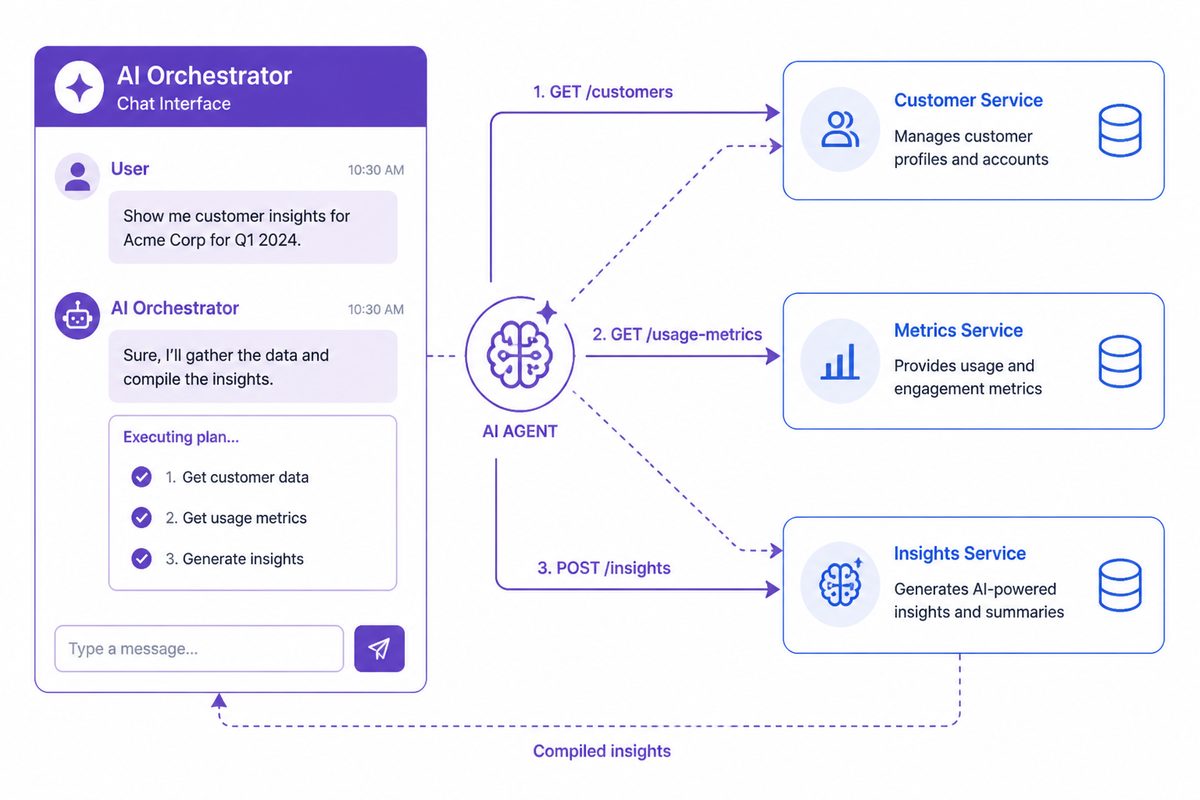
The full code is at examples/agent-demo. Here’s the architecture:
User (natural language)
  │
  ▼
AI Agent (Claude, GPT, etc.)
  │
  ▼
MCP Gateway (:3000)
  │
  ├── ProjectService.Create / Get / List
  ├── TaskService.Create / List / Update
  └── TeamService.Add / List / Get
The MCP gateway discovers all three services automatically and exposes 9 tools. The agent sees them and knows how to call them — because we wrote good comments.
Step 1: Define Your Types
Every field gets a description tag. This is what the agent reads:
type Task struct {
    ID        string `json:"id" description:"Unique task identifier"`
    ProjectID string `json:"project_id" description:"ID of the project this task belongs to"`
    Title     string `json:"title" description:"Short task title"`
    Status    string `json:"status" description:"Task status: todo, in_progress, or done"`
    Assignee  string `json:"assignee,omitempty" description:"Username of the person assigned"`
    Priority  string `json:"priority" description:"Priority: low, medium, or high"`
}
Notice we list valid enum values (todo, in_progress, done) and mark optional fields with omitempty. This is how the agent knows what it can send.
Step 2: Write Handler Comments
Each handler method gets a doc comment explaining what it does, plus an @example with realistic input:
// Create creates a new task in a project.
// Returns the task with a generated ID, initial status of "todo",
// and default priority of "medium".
//
// @example {"project_id": "proj-1", "title": "Design homepage mockup", "assignee": "alice", "priority": "high"}
func (s *TaskService) Create(ctx context.Context, req *CreateTaskRequest, rsp *CreateTaskResponse) error {
    // ...
}
The MCP gateway extracts this at registration time via go/ast and turns it into a JSON Schema tool definition. The agent sees:
{
  "name": "demo.TaskService.Create",
  "description": "Create creates a new task in a project. Returns the task with a generated ID, initial status of \"todo\", and default priority of \"medium\".",
  "inputSchema": {
    "type": "object",
    "properties": {
      "project_id": {"type": "string", "description": "Project ID to add the task to (required)"},
      "title": {"type": "string", "description": "Task title (required)"},
      "assignee": {"type": "string", "description": "Username to assign (optional)"},
      "priority": {"type": "string", "description": "Priority: low, medium, or high (default: medium)"}
    }
  }
}
That’s everything an agent needs to call this tool correctly.
Step 3: Wire It Up
One file, one main(). Three handlers registered with auth scopes, and MCP enabled with a single option:
func main() {
    service := micro.NewService(
        micro.Name("demo"),
        micro.Address(":9090"),
        mcp.WithMCP(":3000"), // ← MCP gateway on port 3000
    )
    service.Init()

    srv := service.Server()
    srv.Handle(srv.NewHandler(
        &ProjectService{projects: make(map[string]*Project)},
        server.WithEndpointScopes("ProjectService.Create", "projects:write"),
        server.WithEndpointScopes("ProjectService.Get", "projects:read"),
        server.WithEndpointScopes("ProjectService.List", "projects:read"),
    ))
    srv.Handle(srv.NewHandler(
        &TaskService{tasks: make(map[string]*Task)},
        server.WithEndpointScopes("TaskService.Create", "tasks:write"),
        server.WithEndpointScopes("TaskService.List", "tasks:read"),
        server.WithEndpointScopes("TaskService.Update", "tasks:write"),
    ))
    srv.Handle(srv.NewHandler(
        &TeamService{members: make(map[string]*Member)},
        server.WithEndpointScopes("TeamService.Add", "team:write"),
        server.WithEndpointScopes("TeamService.List", "team:read"),
        server.WithEndpointScopes("TeamService.Get", "team:read"),
    ))

    service.Run()
}
mcp.WithMCP(":3000") starts the MCP gateway after the service boots. All registered handlers become tools automatically. That’s it.
What the Agent Can Do
The demo seeds realistic data — 2 projects, 7 tasks, 4 team members. Here’s what happens when you talk to the agent:
Multi-service queries
You: “Give me a status update on the Website Redesign project”
The agent calls ProjectService.Get to fetch the project, then TaskService.List filtered by project ID, and synthesizes:
Agent: The Website Redesign (proj-1) is active. 4 tasks total: 1 in progress (Design new homepage layout, assigned to bob), 3 todo. High-priority items: homepage layout and responsive nav component. The “Write copy for about page” task is unassigned.
That’s three tool calls, zero glue code.
Cross-service reasoning
You: “Who on the team knows React and has available capacity?”
The agent calls TeamService.List with skill=react, gets bob and charlie, then calls TaskService.List for each to check their workload:
Agent: Two team members know React: Bob Park (designer, 1 task in progress) and Charlie Kim (engineer, 1 task todo). Charlie has lighter load — recommend assigning React work to him.
Write operations
You: “Create a high-priority task for alice to set up monitoring on the API v2 project”
The agent calls TaskService.Create:
{
  "project_id": "proj-2",
  "title": "Set up monitoring",
  "assignee": "alice",
  "priority": "high"
}
It knows proj-2 is the API v2 project because it queried ProjectService.List earlier in the conversation.
The Key Insight
None of this required:
- Writing tool definitions or OpenAPI specs
- Building an API wrapper or integration layer
- Configuring the agent with service details
- Any code beyond normal Go handlers with comments
The MCP gateway does the translation. Your comments become the agent’s documentation. Your struct tags become the parameter schema. Your services become tools.
Write a good Go service. Get AI integration for free.
Try It
# Clone and run
git clone https://github.com/micro/go-micro
cd go-micro/examples/agent-demo
go run main.go
Then connect with Claude Code:
{
  "mcpServers": {
    "demo": {
      "command": "go",
      "args": ["run", "."],
      "cwd": "/path/to/go-micro/examples/agent-demo"
    }
  }
}
Or use the WebSocket endpoint at ws://localhost:3000/mcp/ws from any MCP-compatible client.
What’s Next
This demo is a starting point. In production you’d run each service as a separate process, use Consul or etcd for discovery, add JWT authentication, and deploy the standalone micro-mcp-gateway binary in front of everything.
The guides cover all of this:
- Building AI-Native Services — End-to-end tutorial
- MCP Security — Auth, scopes, rate limiting
- Agent Patterns — Architecture patterns for production
Go Micro is an open source framework for distributed systems development. Star us on GitHub — 21K stars and growing.